GoHighLevel Email Deliverability: Why Your Emails Go to Spam and How to Fix It
Your campaigns are scheduled, automations are firing, but engagement is poor and messages land in spam. This is a common problem for agencies and business owners using GoHighLevel (GHL). Fortunately, most deliverability issues are solvable — but only if you address the real causes, not just the obvious symptoms.
Why GHL Email Deliverability Fails
People often blame subject lines, wording, or list quality. While those matter, the root causes usually sit in your sending infrastructure and domain setup. GHL acts as a campaign manager: when it sends email, it hands the message off to SMTP infrastructure. If that infrastructure is shared, misconfigured, or not warmed up, inbox providers will treat your messages with suspicion.
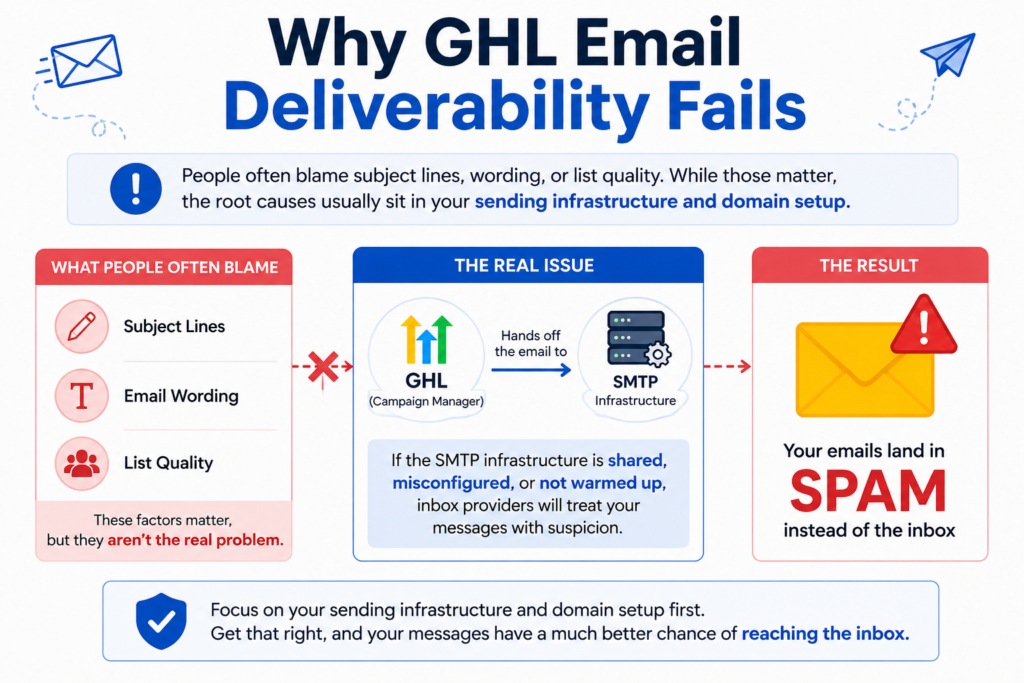
Three primary issues to watch for:
- Shared sending infrastructure: By default, many GHL accounts send through shared services (LC Email on Mailgun), sharing IP addresses with many other users. If another account misbehaves — hitting spam traps or mailing bought lists — the shared IP’s reputation suffers and so do your emails.
- Broken or missing authentication: SPF, DKIM, and DMARC are essential. Missing records, duplicate SPF entries, or unverified DKIM signatures make receivers less likely to trust your mail.
- No warmup for new domains or IPs: A sudden spike of outbound mail from a fresh domain looks like spam activity. Proper warmup gradually builds sending volume so mailbox providers learn to trust you.
Fixes: A Practical Step‑by‑Step Plan
- Move to a dedicated sending domain
Switching from shared infrastructure to your own sending domain is the single most effective change. In GHL, connect a custom SMTP provider (Mailgun, SendGrid, Postmark, etc.) and send from a subdomain such as mail.yourdomain.com or send.yourdomain.com. Recommendations:
- Use a subdomain for bulk mail; avoid using your root domain for marketing sends.
- Separate transactional and marketing traffic across different subdomains when volumes or use cases differ.
- Implement SPF, DKIM, and DMARC correctly
Confirm all three records exist and are valid:
- SPF: Only one SPF record per domain. Include the hosts your SMTP provider uses.
- DKIM: Add the provider’s public key to DNS and verify the signature inside GHL or your SMTP dashboard.
- DMARC: Start with a monitoring policy (p=none) to collect reports, then move to p=quarantine or p=reject after your sending stabilizes.
Use tools like MXToolbox or Mail-Tester to validate records and identify conflicts.
- Warm up your sending domain and IP
Don’t blast your whole list right away. A phased warmup builds reputation:
- Week 1: 50–100 highly engaged recipients per day
- Week 2: 300–500 per day
- Week 3: 1,000–2,000 per day
- Week 4+: Grow gradually, guided by engagement
You can run warmups manually or use third‑party warmup services to automate reputation building.
- Clean your lists and adjust sending behaviour
Infrastructure helps, but clean lists and healthy sending habits keep reputation intact:
- Remove hard bounces immediately; aim for bounce rates under 2%.
- Suppress or re‑engage unresponsive contacts; anyone inactive for 90+ days should be re‑qualified before receiving regular campaigns.
- Always send from a branded domain, not @gmail or other free providers.
- Keep email content simple: minimal links, straightforward HTML, and one call-to-action. Avoid heavy templates and spammy phrases.
- Monitor deliverability metrics
Once you use a dedicated domain, track these KPIs for every campaign:
- Delivery rate: target ≥97%
- Open rate: healthy expectation 25–40% for well-maintained lists
- Bounce rate: keep <2%
- Spam complaints: under 0.1%
If you connect an external SMTP provider, check its dashboard (Mailgun, SendGrid, Postmark) for deeper metrics — GHL may not expose every detail.
Common Mistakes to Avoid
- Staying on default shared LC Email and expecting enterprise-level deliverability.
- Creating a dedicated domain but skipping warmup.
- Neglecting DMARC because SPF and DKIM “seem fine.”
- Mailing cold or purchased lists.
- Failing to monitor bounce and complaint metrics after sends.
Quick FAQ
1. Does GoHighLevel have good deliverability?
It depends on setup. Shared infrastructure makes results inconsistent. A properly authenticated, warmed-up dedicated sending domain provides deliverability comparable to any major platform.
2. Why do my GHL messages go to spam?
Typical causes: shared IP reputation, missing/misconfigured SPF/DKIM/DMARC, lack of warmup, and sending to dirty or cold lists. Fix authentication and infrastructure first, then address list hygiene and content.
3. Which SMTP provider is best for GHL?
Mailgun and SendGrid are common; Postmark is great for transactional messages. Provider choice matters less than correct configuration and warmup.
4. How long to fix deliverability?
DNS authentication typically propagates in 24–48 hours. A proper warmup takes 2–4 weeks. If reputation is severely damaged, recovery can take 4–8 weeks of consistent low-volume, engaged sending.